


A website usually becomes slow because of large images, poor hosting, excessive JavaScript, too many plugins, render-blocking resources, database issues, missing caching, or slow server response times. The fastest way to diagnose the problem is by testing your site with tools like Google PageSpeed Insights, GTmetrix, or DebugBear, then fixing the highest-impact issues first. For Calgary businesses, hosting location matters too a server sitting in Europe or Asia adds real, measurable delay for local visitors in Alberta.
Why Is My Website Slow? (And How to Fix It)
A slow website rarely has just one problem.
More often, it’s a collection of small issues that build up over time. One oversized image, a handful of unnecessary plugins, a slow hosting plan, several tracking scripts, and a page builder loaded with animations can easily turn what should be a two-second page load into six or seven seconds.
The frustrating part is that many website owners start fixing the wrong things first. They compress a few images or install another caching plugin, yet the site still feels sluggish.
That’s because website speed isn’t controlled by a single factor. It’s the result of how your server, browser, code, media files, database, and third-party services work together.
If visitors have to wait, many won’t wait at all. Studies consistently show that slower websites lead to fewer conversions, lower engagement, and higher bounce rates. Google also considers page experience and Core Web Vitals when evaluating search performance, making website speed important for both users and SEO, including local SEO for businesses trying to rank in Calgary and nearby communities like Airdrie, Cochrane, Okotoks, and Chestermere.
The good news? Most performance issues can be identified and fixed with a structured approach, and it doesn’t require rebuilding your website from scratch.
How to Tell If Your Website Is Actually Slow
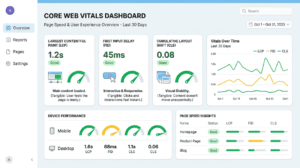
Before making changes, measure your current performance.
Use these free tools:
|
Tool |
Best For |
|
Core Web Vitals |
|
|
Performance waterfall |
|
|
Real-user insights and diagnostics |
|
|
Network requests |
|
|
Overall performance audit |
Don’t rely on a single speed score. Instead, focus on the metrics that affect real visitors and test from a Canadian location or with a Canadian server node selected, where the tool allows it, since ping times to your hosting server change your results.
The Most Important Website Speed Metrics
Largest Contentful Paint (LCP): Measures how quickly the largest visible element loads. Target: under 2.5 seconds.
Interaction to Next Paint (INP): Measures how responsive your website feels after users interact with it. INP replaced First Input Delay (FID) as a Core Web Vital because FID only measured the delay before a browser could start processing an interaction, while INP measures the full responsiveness of that interaction from click to visual update, a more honest picture of what a visitor actually experiences. Target: under 200 milliseconds.
Cumulative Layout Shift (CLS): Measures unexpected movement while the page loads. Target: below 0.1.
Time to First Byte (TTFB): shows how quickly your server starts responding. A slow TTFB usually indicates hosting or backend problems rather than front-end design. Google recommends keeping server response time low, and as a practical benchmark, most performance specialists flag anything consistently above 600 milliseconds as worth investigating, with anything under 200 milliseconds considered a strong result.
15 Common Reasons Your Website Is Slow
1. Your Images Are Too Large

This is still the biggest performance problem on many websites.
Uploading a 6 MB photo directly from a phone or camera forces every visitor to download that file, even if it’s displayed as a small image on the page.
Fix it:
- Resize images before uploading
- Convert JPEG and PNG files to WebP or AVIF where supported
- Compress images without noticeable quality loss
- Use responsive image sizes
- Enable lazy loading for below-the-fold images
2. Cheap or Overloaded Hosting

No amount of front-end optimization can compensate for an overloaded server.
Many low-cost shared hosting providers place hundreds of websites on the same server, increasing response times during busy periods.
Signs include:
- Slow admin dashboard
- High TTFB
- Random slowdowns
- Performance that varies by time of day
If these issues persist, upgrading your hosting plan often has a bigger impact than installing another optimization plugin. This is one of the most common issues we diagnose during a website maintenance review for Calgary clients; many are paying for hosting that was fine five years ago, but can’t keep up with their site today.
3. Too Many Plugins
This is especially common on WordPress websites.
Not every plugin is harmful, but poorly coded or unnecessary plugins can:
- Load additional CSS
- Add JavaScript
- Make external API requests
- Increase database queries
Instead of counting plugins, evaluate their quality and whether each one is truly needed.
4. Heavy JavaScript
JavaScript powers interactive features, but excessive scripts delay page rendering.
Common offenders include:
- Sliders
- Animation libraries
- Chat widgets
- Popups
- Marketing tools
- Tracking scripts
Load only what’s necessary and defer non-critical JavaScript wherever possible.
5. Render-Blocking CSS
When browsers encounter large CSS files, they often pause rendering until those files finish downloading.
This creates the impression that nothing is happening.
A better approach is to:
- Inline critical CSS
- Remove unused styles
- Minify CSS files
- Load non-essential styles asynchronously where appropriate
6. Too Many Third-Party Scripts
Many websites load resources from:
- Analytics platforms
- Social media widgets
- Google Maps
- Marketing software
- Embedded videos
- Review platforms
Every external request introduces additional DNS lookups, secure connections, and download time. Even if your own server is fast, third-party services can slow the page.
7. Missing Browser Caching
Without browser caching, returning visitors download the same assets repeatedly.
Proper cache headers allow browsers to reuse files like:
- Logos
- CSS
- JavaScript
- Fonts
This reduces load times significantly for repeat visits.
8. Unoptimized Fonts
Web fonts often receive less attention than images, yet they can delay text rendering.
Best practices include:
- Limiting font families
- Serving fonts locally when practical
- Preloading important fonts
- Removing unused font weights
9. Your Database Needs Optimization
As your website grows, so does its database. Every blog post, revision, form submission, comment, and plugin can add unnecessary data over time.
On content management systems like WordPress, a bloated database can slow page generation and increase server response times.
Signs your database may be slowing down:
- The admin dashboard feels sluggish
- Pages take longer to load after publishing more content
- Database backups become unusually large
- Search and filtering features respond slowly
How to fix it:
- Remove post revisions you no longer need
- Delete spam comments and unused drafts
- Clear expired transients and temporary data
- Remove leftover tables from deleted plugins
- Schedule routine database maintenance
Pro tip: Database optimization won’t make every website dramatically faster, but it can noticeably improve performance on content-heavy or older websites.
10. You’re Not Using a Content Delivery Network (CDN)
When every visitor downloads files directly from your origin server, people who are geographically farther away often experience slower load times.
A Content Delivery Network (CDN) stores copies of your static files on servers around the world. Visitors receive content from the nearest location instead of your main server.
A CDN is especially valuable if your audience is spread across multiple countries — or even across a large region like Alberta, where visitors in Calgary, Edmonton, Red Deer, and rural communities may be relying on different connection speeds.
Benefits of a CDN:
- Faster image delivery
- Lower server load
- Better global performance
- Improved reliability during traffic spikes
- Added security features with many providers
Popular CDN providers include Cloudflare, Amazon CloudFront, Bunny CDN, and Fastly.
11. Too Many Redirects
Redirects are useful when pages move, but chains of redirects add unnecessary delays.
For example: Page A → Page B → Page C → Final Page.
Each step requires another request before the browser reaches the destination.
Best practice: Redirect directly to the final URL whenever possible and regularly audit your website for redirect chains and loops.
12. Unnecessary HTTP Requests
Every page element requires a request — including images, icons, CSS files, JavaScript files, fonts, and videos.
A page containing dozens or even hundreds of requests takes longer to assemble in the browser.
Reduce requests by:
- Combining small CSS and JavaScript files where appropriate
- Removing unused plugins
- Deleting unnecessary widgets
- Replacing image icons with SVG sprites when practical
- Avoiding decorative assets that don’t improve the user experience
13. Poor Theme or Page Builder Performance
Some themes prioritize visual effects over speed.
Large page builders with multiple animations, sliders, and custom scripts can significantly increase page size.
If every page loads hundreds of kilobytes of unused CSS and JavaScript, performance suffers regardless of your hosting provider.
What to look for:
- Lightweight themes
- Optimized page builders
- Minimal animations
- Clean HTML structure
Before installing a new theme, test its demo with PageSpeed Insights or Lighthouse.
14. Videos and Large Media Files
Embedding multiple videos above the fold forces browsers to load heavy resources before users can interact with the page.
Better approach:
- Use preview thumbnails instead of auto-loading videos
- Lazy load embedded videos
- Host videos on platforms like YouTube or Vimeo instead of your own server unless necessary
- Compress downloadable media files
15. Your Website Has Simply Outgrown Its Current Setup
Sometimes nothing is “broken.” The website has just become larger than the infrastructure it started with.
A business that once had 10 pages, 50 visitors a day, and one contact form may now have hundreds of pages, thousands of monthly visitors, e-commerce functionality, booking systems, CRM integrations, marketing automation, live chat, and membership portals.
As complexity grows, your hosting, caching strategy, database, and optimization methods need to evolve too. This is usually the point where an ongoing website maintenance plan becomes worth more than a one-time fix.
Which Fixes Have the Biggest Impact?
Instead of trying everything at once, prioritize changes that deliver the greatest improvement.
|
Priority |
Fix |
Expected Impact |
|
⭐⭐⭐⭐⭐ |
Upgrade hosting |
Very High |
|
⭐⭐⭐⭐⭐ |
Compress and resize images |
Very High |
|
⭐⭐⭐⭐⭐ |
Enable page caching |
Very High |
|
⭐⭐⭐⭐☆ |
Remove unnecessary plugins |
High |
|
⭐⭐⭐⭐☆ |
Minify CSS & JavaScript |
High |
|
⭐⭐⭐⭐☆ |
Use a CDN |
High |
|
⭐⭐⭐☆☆ |
Optimize fonts |
Medium |
|
⭐⭐⭐☆☆ |
Reduce third-party scripts |
Medium |
|
⭐⭐☆☆☆ |
Clean database |
Medium |
|
⭐⭐☆☆☆ |
Reduce redirects |
Moderate |
A Simple Website Speed Audit Checklist
If you’re not sure where to start, work through this checklist:
- ✅ Test your website with PageSpeed Insights and GTmetrix
- ✅ Check Core Web Vitals
- ✅ Compress oversized images
- ✅ Convert images to WebP or AVIF
- ✅ Enable browser caching
- ✅ Set up page caching
- ✅ Remove unused plugins
- ✅ Update themes and plugins
- ✅ Minify CSS and JavaScript
- ✅ Reduce third-party scripts
- ✅ Optimize your database
- ✅ Use a CDN
- ✅ Review your hosting performance
Completing these steps addresses the majority of performance issues affecting small business websites. If working through this list feels like more than you have time for, this is exactly the kind of ongoing work covered by a website design and development partner or a monthly maintenance plan.
Common Website Speed Myths
Myth 1: A perfect PageSpeed score guarantees a fast website.
Not necessarily. A score is only a benchmark. Real user experience matters more than achieving 100/100.
Myth 2: Installing another caching plugin will solve everything.
Caching helps, but it won’t fix oversized images, poor hosting, or excessive JavaScript.
Myth 3: More plugins always mean a slower website.
The number of plugins is less important than their quality. A few poorly coded plugins can cause more problems than dozens of lightweight, well-maintained ones.
Myth 4: Desktop performance is all that matters.
Most users browse on mobile devices. A site that feels fast on a desktop may still perform poorly on a slower mobile connection something worth testing, specifically if your customers are searching for you on the go around Calgary.
Real-World Example: A Calgary Business That Fixed Its Speed Problem
Imagine two local service businesses with nearly identical websites.
Website A
- 7 MB homepage
- Shared hosting
- 35 plugins
- Uncompressed images
- Five marketing scripts
- Load time: 7.2 seconds
Website B
- Optimized images
- CDN enabled
- Fast hosting
- Browser caching
- Lightweight theme
- Load time: 1.9 seconds
We’ve seen this play out with our own Calgary clients. Arbutus Hardwood Floors, a hardwood flooring contractor serving Calgary and the surrounding area, is a good example of a local service business whose site was rebuilt with the fundamentals in this article in mind optimized images, clean code, and fast hosting rather than the “add more plugins” approach many small business sites drift toward over time.
Even if both businesses offer the same service, the faster site is more likely to keep visitors engaged, generate inquiries, and support better organic search performance, because users can interact with the site much sooner.
Final Thoughts
Website speed isn’t about chasing a perfect score or applying every optimization technique available. It’s about removing the bottlenecks that have the biggest effect on your visitors.
Start with accurate testing, identify the highest-impact issues, and tackle them one by one. In many cases, a few targeted improvements such as optimizing images, upgrading hosting, enabling caching, and trimming unnecessary scripts can dramatically improve load times without rebuilding your website.
Remember that performance is an ongoing process. As your site grows, regularly monitor Core Web Vitals, review third-party tools, and audit new content to keep your website fast, responsive, and ready to convert visitors.
If you’d rather have this handled for you, our website maintenance services are built specifically for Calgary small and medium businesses that want ongoing speed, security, and performance monitoring without having to manage it themselves. And if slow speed is one symptom of a bigger problem outdated design, poor mobile experience, or a site that isn’t generating leads our SEO and digital marketing teams can help you look at the whole picture.