


Your team lives in spreadsheets. New leads sit in someone’s inbox for three days. A quote gets typed out by hand for the fifth time this week.
That’s usually when owners start searching for a custom CRM and workflow automation agency. What they want is work that moves without someone pushing it along by hand.
Picking the right agency matters more than picking the right tool. Some will sell you a template and call it custom. Others will build something so complicated that your staff never touch it.
Here’s what these agencies actually do, when a ready-made system is the smarter buy and the questions I’d ask before signing anything.
What a custom CRM and workflow automation agency actually does
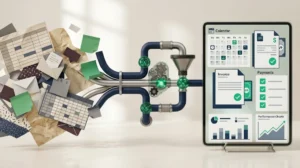
The label covers three jobs. A good agency handles all of them.
Custom CRM development services
The agency builds the system that holds your contacts, deals, jobs and history, shaped around how your business really works.
A roofing company tracks inspections, quotes and crews. An accounting firm tracks clients, filing dates and documents. A generic CRM makes both of them bend. Custom CRM development services start with your process, then build the screens, fields, permissions and reports around it.
Workflow automation
This is the part that gives time back. Rules do the repetitive work for you.
A web form comes in, so the system creates the contact, assigns an owner, sends a text and sets a follow-up task. A quote gets accepted, so the invoice is created and the job lands on the calendar.
Connecting your other tools
Your CRM has to talk to your website forms, email, calendar, accounting software and phone system. The agency builds those connections through APIs so information gets entered once and shows up everywhere it’s needed.
When those three pieces work together, a lead can move from first click to a booked job with a human stepping in only when a human adds something.
Custom CRM vs off-the-shelf: which one fits your business?
The build vs buy question deserves an honest answer. Plenty of small businesses are better off with a ready-made platform.
A tool like Thrive CRM covers lead capture, pipelines and scheduling out of the box. It usually costs less to start, too.
Here’s how the two routes compare:
Factor | Off-the-shelf CRM | Custom CRM |
Setup time | Days to weeks | Weeks to months |
Upfront cost | Lower | Higher |
Fit with your process | You adapt to the tool | The tool adapts to you |
Unusual workflows | Limited or needs workarounds | Built in from the start |
Ongoing fees | Per-user subscription | Hosting and support, often with no per-seat fees |
Ownership | You rent access | You can own the code, depending on your contract |
Best for | Standard sales and booking flows | Complex jobs, quoting and multi-step approvals |
Signs you’ve outgrown off-the-shelf software
Watch for these:
- You pay for add-ons that only half fit
- Staff keep a side spreadsheet because the CRM can’t hold something they need
- Someone’s job is mostly copying data between tools
- Your process is a selling point. The software forces you to water it down
Two of those four? It’s probably time to talk to an agency.
When a ready-made CRM is enough
If your sales process is a simple line of stages, start with a ready-made lead capture and pipeline tool. Then build custom pieces only where it falls short.
That approach protects your budget. It also shows you what your team really uses before you pay for anything bigger.
Business process automation in Calgary: what to automate first

Pick the processes that hurt most. Start where delays cost you money.
For Calgary trades, real estate, professional services and retail, that’s almost always the stretch between “someone asked” and “someone got paid.” Here’s the order I’d tackle it in:
- Lead intake and routing. Forms, calls and texts land in one place and get assigned automatically. If your website brings visitors but few enquiries, our guide on how to generate leads from your website covers the front half of this process.
- Follow-up. An instant text or email, then reminders if nobody replies after two days. Speed to reply often decides who wins the job.
- Quotes and proposals. Pull prices and templates into a ready-to-send document.
- Scheduling and reminders. Bookings, confirmations and no-show nudges without anyone chasing them.
- Invoicing and payment chasing. Send the invoice when the job closes and follow up politely when it’s late.
- Client onboarding. Checklists, document requests and welcome messages that go out on their own.
A CRM gets more useful with every channel that feeds it. If you run ads or SEO, our digital marketing services team can help you trace which campaigns lead to real customers.
Start with one or two of these. Prove they work. Then add more.
Three workflow automation examples you can copy

Ideas land better with a picture. Here are three setups that fit common Calgary businesses.
A home services company
An enquiry arrives through the website form at 9 p.m. Within a minute, the system texts the customer and offers a calendar link for an estimate. It alerts the estimator, creates a job card and attaches the photos the customer uploaded.
After the visit, a quote built from your price list goes out. If nobody replies in two days, a reminder follows. When the job closes, the invoice and a review request are sent.
A professional services firm
A new client signs the agreement. The system creates an onboarding checklist, emails a document request and adds filing deadlines to the calendar.
Every week, it nudges the client about missing documents. Your staff stop writing the same reminder email by hand.
A real estate team
Leads from ads and listing portals land in one pipeline. Rules assign each lead by area or by agent availability, then start a follow-up sequence.
After closing, the system schedules a check-in every six months. Past clients become referrals instead of strangers.
Notice the pattern in all three: a trigger, an action and a check. Every good automation has those three parts. It’s a handy test when an agency pitches you a new rule.
How a custom CRM project runs, step by step
A focused build often takes two to three months. Larger systems take longer. Here’s the usual path:
Stage | What happens | Typical time | Your part |
Discovery | The agency maps your current process and finds the bottlenecks | 1 to 2 weeks | Walk them through a real day of work |
Scope and quote | Features, priorities and a fixed or phased price | About 1 week | Decide what’s essential |
Design and prototype | Clickable screens you can test | 2 to 3 weeks | Give blunt feedback |
Build | Database, screens, automations and permissions | 4 to 12 weeks | Answer questions quickly |
Connect and migrate | Link your tools and move your data | 1 to 3 weeks | Clean up old records |
Test and train | Real scenarios, bug fixes and staff training | 1 to 2 weeks | Get your team in the room |
Launch and support | Go live with help on hand | Ongoing | Report what feels off |
Ask for a working prototype early. Seeing real screens in the first month catches wrong assumptions while they’re still cheap to fix.
Also insist on a phased plan. Launch the core first, then add the extras once your team is using it daily.
What to ask before you hire a custom CRM and workflow automation agency
Portfolios all look good. Questions show you who you’re dealing with.
Questions worth asking
- Can I see a system you built for a business like mine? Better still, can I talk to that client?
- Who owns the code and the data when we finish? Get the answer in the contract.
- Where will my data live? Ask about hosting, backups and who has access. If you serve Canadian customers, ask how they handle PIPEDA.
- Who actually does the work? Your own team or subcontractors?
- Will you build in phases? A launch of the core first lowers your risk.
- What happens after launch? Find out about support hours, bug fixes and response times.
- How do you price changes mid-project? Scope shifts happen. You want the rules agreed in advance.
Red flags
Be cautious when an agency:
- Quotes a final price after a ten-minute call
- Pushes the same platform on every client
- Can’t show a prototype before building
- Gets vague about who owns the finished system
- Won’t let you speak to past clients
One or two of these might be a bad day. Three or more means keep looking.
What drives the cost of a custom CRM
I won’t pretend a single number fits everyone. Two businesses can ask for “a CRM” and need very different amounts of work.
These factors move the price most:
- Users and permissions. A team of 5 with two roles is simpler than 40 people with approval chains.
- Number of automations. Each rule needs designing, building and testing.
- Connections to other tools. Accounting, email, phone and website links add up.
- Data migration. Messy spreadsheets take longer to clean than tidy exports.
- Reports and dashboards. Custom reporting is often where scope quietly grows.
- Extras. Client portals, mobile access and strict security needs all add work.
Most agencies price one of three ways: a fixed fee for a defined scope, hourly billing or a phased plan. Phased plans usually give you the most control.
Compare quotes line by line. A cheaper quote that leaves out testing, training or support will cost more later.
One more thing to weigh. A ready-made CRM charges a monthly fee per user, forever. A custom build costs more up front. Over several years it can come out ahead once your team grows.
Common mistakes with custom CRM projects
These trip up more projects than technical problems do.
- Automating a broken process. If your quoting steps are a mess today, a faster mess won’t help. Fix the process on paper first.
- Building everything for launch day. Big-bang launches overwhelm staff. Release the core and add features as people settle in.
- Skipping the people who’ll use it. Sit the agency down with the receptionist, the estimator and the bookkeeper. They know where work gets stuck.
- Ignoring data quality. Duplicate contacts and missing phone numbers cause bad automations. Clean before you migrate.
- Having no internal owner. Someone on your team needs to answer questions, test features and champion the system.
- Choosing on price alone. The lowest quote often leaves out testing, training and support. You pay for those later.
Keep your CRM healthy after launch
Launch day is the start. The best systems get small tune-ups all year.
- Train people properly. A 30-minute session plus a one-page cheat sheet beats a long manual nobody reads.
- Check adoption. If half your team never logs in, find out why. The fix is usually a missing field or a clunky screen.
- Review your automations quarterly. Processes change. Old rules can send the wrong message.
- Keep backups and security updates current. Test a restore once a year.
- Ship small improvements monthly. One new report or one saved step keeps people on board.
Your website is where many CRM leads begin, so it needs the same care. Our website maintenance team looks after hosting, updates and security for the forms and pages that feed your system.
Conclusion: pick the agency first and the tool second
The right custom CRM and workflow automation agency starts with your process and builds the smallest system that fixes your biggest bottleneck. Ask for an early prototype, get ownership of the code in writing and plan the build in phases.
Want a Calgary team to look at your workflow? Talk to our software development team about a custom CRM. We’ll listen first and quote second.