


Most business owners don’t think much about website maintenance until something breaks. A contact form stops working. The website becomes slow. Pages disappear from Google. A plugin update causes a layout issue. Suddenly, a website that was supposed to help generate leads starts creating problems instead.
Having a website maintenance checklist is one of the simplest ways to avoid these issues. Whether you run a local business in Calgary, Airdrie, Cochrane, Okotoks, or anywhere else, your website needs regular attention. Not every day, and not even every week in some cases but it must be consistent.
Many small businesses spend thousands of dollars building a website and then completely forget about it. The website goes untouched for months. Updates pile up, security vulnerabilities increase, and performance drops. Eventually, the website starts costing you money instead of helping your business grow.
This guide covers the core website maintenance tasks every small business should perform in 2026 to keep your digital storefront secure, fast, and converting visitors into customers.
Why Website Maintenance Matters More Than Ever
A few years ago, businesses could get away with neglecting their websites for a while. Today, things are different.
Search engines pay closer attention to user experience metrics than ever before. Customers expect instant loading speeds, and mobile users make up the vast majority of website traffic in most service industries. If your website loads slowly, has broken pages, or contains outdated information, visitors will leave before taking action.
Website maintenance isn’t just about fixing problems, it’s about preventing them. Poorly maintained sites directly suffer from:
- Lost Revenue: Broken contact forms mean missed leads and lost clients.
- SEO Ranking Drops: Google pushes slow, broken websites down the search results.
- Security Vulnerabilities: Outdated software leaves a backdoor open for malware and hackers.
- Damaged Reputation: A broken user experience makes a business look unprofessional or inactive.
What is Included in a Core Maintenance Plan?
Every business website has unique needs, but a reliable baseline protocol focuses on these central categories:
|
Maintenance Area |
Purpose |
|
Security Updates |
Protect user data and block vulnerabilities |
|
Automated Backups |
Prevent data loss in case of a crash or hack |
|
Performance Monitoring |
Maintain fast loading speeds for users and search engines |
|
Content & Links |
Keep business info accurate and fix broken URLs |
|
Form Testing |
Ensure lead generation and contact systems work perfectly |
|
Uptime Monitoring |
Detect and fix server downtime before customers notice |
Think of your website like a company vehicle. You would never drive a truck for years without changing the oil, checking the brakes, or inspecting the tires. Websites work the same way. Small, routine checkups prevent expensive emergency repairs later.
Website Security Updates Should Never Be Ignored
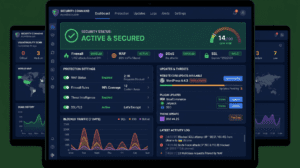
Security is often the first thing small business owners overlook, assuming hackers only target large corporations. In reality, automated bots target small business websites every day because they know many of them have weak security practices.
1. Update CMS Software
Whether your website runs on WordPress, Shopify, Wix, or a custom setup, platform updates should be installed as soon as they are stable. These updates patch critical security flaws, fix background bugs, and improve framework speed. Leaving them uninstalled leaves known vulnerabilities exposed to public exploits.
2. Update Plugins and Extensions
Plugins add great functionality, but outdated extensions are the leading cause of hacked business sites. Review your active plugins monthly. Update them safely on a staging site or during low-traffic hours, and completely delete any plugins you no longer use.
3. Audit User Accounts
Look closely at who has access to your site. Check for old employee profiles, temporary developer logins, or generic administrator accounts. If someone no longer needs access to make changes, downgrade their role, or delete the account entirely.
Create Regular Website Backups
A backup is a complete copy of your website that can be fully restored in minutes if something goes wrong. They are often ignored until a failed update or a malware infection brings the site down at which point a recent backup becomes the most important asset you own.
Recommended Backup Schedule
|
Website Type |
Backup Frequency |
Storage Strategy |
|
Standard Service Business |
Weekly |
Automated cloud storage (off-server) |
|
Active Blog / Media Site |
Daily |
Kept in at least two separate locations |
|
E-commerce / High Traffic |
Daily or Real-Time |
Automated after every transaction |
Monitor Website Speed and Performance
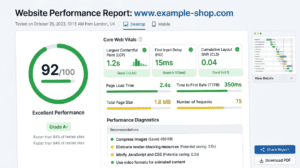
Website speed is a critical ranking factor and a massive component of user experience. If a page takes more than a few seconds to load, potential clients will bounce back to Google and click a competitor.
- Track Page Load Speed: Run your core pages through tools like Google PageSpeed Insights or GTmetrix monthly to watch for performance drops.
- Optimize Images: Large, uncompressed images are the number one cause of slow load times. Always compress images before uploading them, and utilize modern web formats like WebP.
- Clean Up the Database: Over time, websites accumulate spam comments, post revisions, and temporary data. Regular database optimization keeps your server running lean.
Test Contact Forms and Lead Generation Systems
This is arguably the most overlooked maintenance task online. A contact form, booking widget, or quote request system can break silently due to a plugin conflict or email server issue.
Weeks pass by with zero inquiries, leaving the business owner to assume the market is just slow. Meanwhile, potential customers have been trying to reach out the entire time, receiving error messages or sending leads into a black hole.
The Fix: Manually test every contact form, quote request tool, and signup box at least once a month. Confirm the submission goes through successfully and that the notification email arrives in your inbox.
Review Website Content and Broken Links
Your business evolves, and your website should reflect that. Displaying outdated pricing, old hours, or retired service areas creates confusion and erodes trust instantly. Businesses that regularly update their websites, such as City Wide Courier, make it easier for customers to find accurate information while supporting a better user experience and stronger long-term SEO performance.
Regularly check your core service pages to update your business hours, team bios, current pricing, and service footprints. For local brands, clean internal linking helps clients find exactly what they need. For example, if you mention local maintenance protocols in an educational blog post, ensure it links naturally to a dedicated Website Maintenance Services Calgary page.If visitors are comparing service options, you can also direct them to your Website Maintenance Cost in Calgary guide, which explains the factors that influence pricing and what businesses can typically expect from an ongoing maintenance plan.
Similarly, use tools like Screaming Frog or Google Search Console to scan for 404 errors (broken links). Broken links frustrate users and signal to search engines that the website is neglected.
Monitor Core Web Vitals and Mobile Usability
Most small businesses receive the majority of their traffic from smartphones, yet many owners only ever look at their website from a desktop computer. This creates blind spots where buttons overlap text, menus become impossible to click, or forms break completely on smaller screens.
Additionally, Google tracks Core Web Vitals to judge your mobile user experience:
- Largest Contentful Paint (LCP): How fast the main content loads.
- Interaction to Next Paint (INP): How responsive the page feels when a user clicks a button or menu.
- Cumulative Layout Shift (CLS): Visual stability ensuring items don’t shift around unexpectedly while loading.
Test your website on multiple actual mobile devices (iPhone, Android, and tablets) quarterly to ensure your layout remains solid and stable. If your site consistently fails these mobile benchmarks, it may be time to invest in a professional Website Design Calgary solution that prioritizes mobile responsiveness, fast performance, and a better user experience.
Common Website Maintenance Mistakes to Avoid
- Operating Reactively: Waiting for the site to crash or go offline before checking its health.
- Storing Backups on the Same Server: If your hosting server fails or gets hacked, your backup files disappear along with your live site. Always store backups in an external cloud location.
- Ignoring Analytics: Failing to look at Google Analytics or Search Console means you miss valuable trends, sudden traffic drops, or crawl errors.
- Chasing the Cheapest Hosting: Ultra-low-cost shared hosting often leads to poor uptime, slow server response times, and limited security features.
The Master Website Maintenance Checklist
|
Task |
Frequency |
Target Metric / Goal |
|
Check Uptime Monitoring |
Weekly |
99.9% availability |
|
Run Core Security Scans |
Weekly |
Zero malware or unauthorized file edits |
|
Test Lead/Contact Forms |
Weekly |
Successful delivery confirmation |
|
Apply Plugin & Theme Updates |
Weekly / Monthly |
Vulnerability patch compliance |
|
Verify Backup Integrations |
Monthly |
Confirm restoration points are valid |
|
Scan for Broken Links (404s) |
Monthly |
Zero broken internal or external links |
|
Audit Analytics & Search Console |
Monthly |
Catch data spikes or indexing errors |
|
Test Mobile Performance & INP |
Quarterly |
Seamless navigation on all screen sizes |
|
Full SEO & Content Audit |
Quarterly |
Update old info and check ranking shifts |
When Should You Hire a Professional?
Not every small business owner wants to spend their weekends troubleshooting server errors, updating databases, or running security audits. As your business grows, your time is best spent working on your business, not fixing broken code.
Partnering with an experienced digital team for your maintenance handles the heavy lifting including proactive security monitoring, off-site backup management, speed optimization, and technical troubleshooting. The goal of a maintenance plan isn’t just to keep a website online; it’s to ensure your digital storefront never stops capturing leads and driving revenue for your business.
Keep Your Website Secure and Performing at Its Best
Don’t wait for a broken plugin or a critical server error to cut off your client inquiries. Reach out today for a comprehensive website audit, or let us manage your ongoing technical maintenance so you can focus entirely on growing your business.
Conclusion
A successful website maintenance routine doesn’t require hours of work every single day. Instead, it relies on small, consistent actions that catch minor bugs before they turn into major liabilities.
Taking twenty minutes a week to check your forms, verify your backups, and clear out outdated plugins will keep your site fast, safe, and visible on Google. A little proactive attention now saves a significant amount of stress, lost revenue, and emergency repair fees down the road.